Mitsubishi Lancer Evo VIII
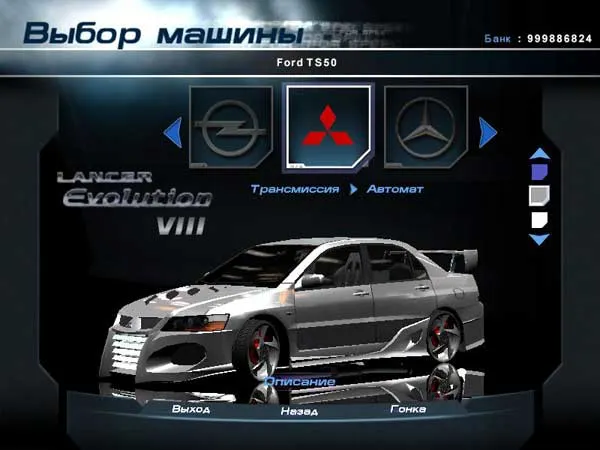
Car for Hot Pursuit 2. Conversion from NFS: Underground. Replaces Ford TS50.
How to install: Extract the CARS folder to the game's root directory. If you want to replace a different car, copy all files from the extracted archive's TS50 folder to the desired folder in the game's CARS directory.
Additional installation (optional, necessary only to
show the car's logo and name in the menu):
Use the FSH tool and VIV Magic programs (can be downloaded from our site).
1. Unpack the GUIart.viv file from the FRONTENDGUI folder using VIV Magic.
2. In the resulting GUIart folder, find the alogoM.lyr.pcd.fsh file. In its properties, specify the program it should open with - specify the path to the FSHTool program.
3. The file will be unpacked and the alogoM.lyr.pcd folder will appear. It contains all car logos. Delete the required ones (in our case, these are 0006 and 0006-a). From the Badging archive folder, copy the Mits and Mits Alpha files and rename them according to the deleted files (in our case, 0006 and 0006-a respectively).
4. Now click the index.fsh file; this will pack all files back into alogoM.lyr.pcd.fsh.
5. Similarly, we will replace the car name. Unpack the alogoN.lyr.pcd.fsh file and in the resulting folder delete and replace with the new images Evolution VIII and Evolution VIII a. (in our case, 0018 and 0018-a). Click index.fsh.
6. Delete the alogoN.lyr.pcd and alogoM.lyr.pcd folders.
7. Launch VIV Magic, select File - Pack File and find GUIart.idx.
8. Now you can delete the GUIART folder.